Guides
Plans and billing
Compare the three plans, check which one you are on, move to a bigger one, and change or cancel billing. For anyone with a nertia account. Prices come from the plan list, and nothing is charged until you confirm.
Needs Free · 4 minutes
Before you start
- A nertia account. Zero-Point is free and needs no card.
- Pressing Get Particle, Get Wave or Manage billing leaves nertia for Stripe, which handles the card. Looking at the pages below costs nothing.
1. See the plans
Open Pricing. Each plan is a card with what it includes and a button to pick it.

Every plan is billed monthly. There is no annual plan.
| Plan | Price | What you get |
|---|---|---|
| Zero-Point | Free | One site at yourname.nertia.ai, the visual builder and every layout, the Claude connector, unlimited collaborators |
| Particle | $12 a month | Everything in Zero-Point, your own domain hosted by us, social posting and scheduling, a store with no transaction fee, code sites from your own repo, AI with your own key or coin |
| Wave | $18 a month | Everything in Particle, unlimited sites, $6 of coin every month that rolls over up to $12, top up with coin or use your own key |
2. Check your plan
Open Account and scroll to the Plan card.

The card has three rows.
| Row | What it shows |
|---|---|
| Plan | Your plan and what it costs. Extra sites show under it. Payment due shows beside it if a payment failed |
| Sites | How many sites you have, out of how many your plan covers |
| Coin | Your coin balance. Coin pays for AI. Buy $5 or $20 at a time. It never expires |
- Zero-Point covers one site. For a second one, move to Particle.
- Particle covers one site too, and each extra site is $5 a month. Two sites on Particle come to $17 a month.
- Wave is $18 a month with no limit, so from the third site on Wave costs less.
- On Particle you buy coin or connect your own Anthropic key. Wave includes $6 of coin every month. Whatever you don't use rolls over, up to $12.
- Your own domain comes with Particle and Wave, and hosting is included. Setup is in Connect a domain.
3. Move to a bigger plan
On Pricing, press the button on the plan you want. It opens Account with a card asking you to confirm the move.

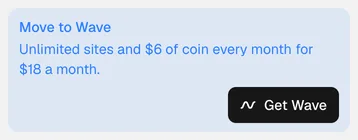
The card tells you what the move gives you and what it costs. Press Get Particle or Get Wave to go on to Stripe. If you are already on that plan, the card says "Nothing to change." Zero-Point shows a Change plan button on the Plan card that goes to Pricing.
Site care or social management is $50 a month each, or $90 for both, with 1 on 1 consulting. It sits on top of Particle or Wave. Book a call to set it up.
4. Change or cancel
Press Manage billing on the Plan card. It opens Stripe's own billing page, where you update your card, see invoices, change plan or cancel.

The button shows once you have a paid plan. Stripe's page is not part of nertia, so these pictures stop here. You change nothing until you confirm there, and Account is where you land when you come back.
Done
The Plan card on Account shows your plan, what it covers, and where to change it. Next: export your site or bring one in.
Problems
- Billing did not open. Try again in a moment. If you moved from an older plan, reply to your receipt email or book a call and we will move you over.
- Your plan did not load. The card says so. Reload the page.
- A payment failed. Your plan keeps working for 7 days while you fix your card.
- You cancel. You keep access to your account. Your sites stay published and editable, and if you have more sites than your plan covers you can't start a new one. Your custom domain keeps working until 14 days after your last paid period ends, then the site goes back to
{slug}.nertia.aiand nothing is deleted. Social posting pauses, and your connections and post history are kept. Coin you bought never expires.